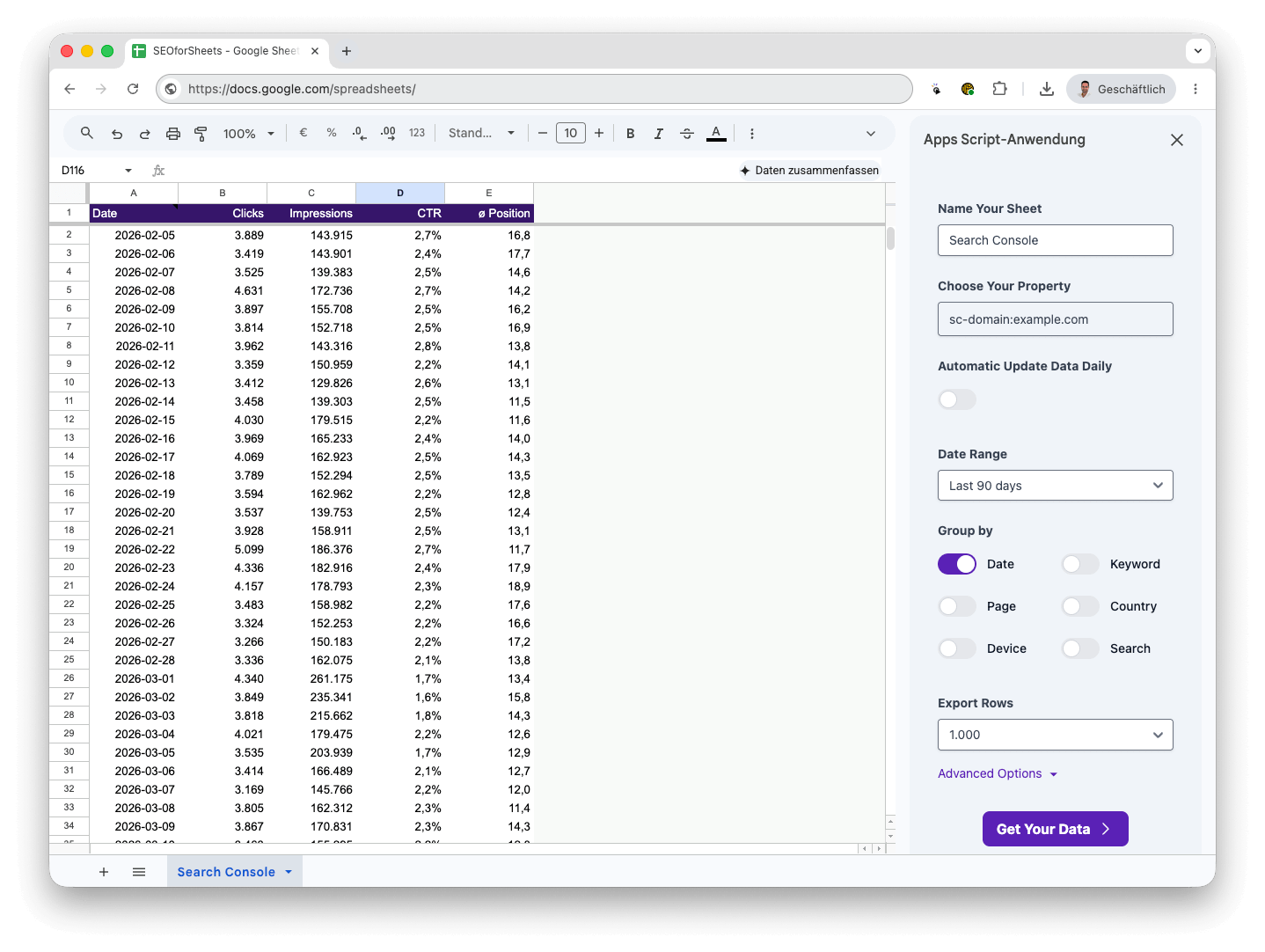
Pull the data that matters — directly into the spreadsheet you already know.
Keywords & Queries
Import all search queries your site ranks for — including clicks, impressions, CTR and average position per keyword.
CTR & Impressions
Analyze click-through rates and impressions over any date range to identify performance trends and quick wins.
Position Tracking
Track your average search positions over time. Spot ranking drops or improvements immediately in your own Sheets.
URL-level Data
Filter by page URL to see exactly which pages rank for which queries — perfect for content audits and optimization.
Country & Device Filter
Segment your data by country or device type (desktop, mobile, tablet) to understand your audience better.
Time Trigger
Schedule automatic imports with the time trigger feature — your data stays fresh without any manual work.
How it works
From install to insights in 4 steps
No API credentials. No coding. Just install, connect, and get your data.
1
Install the Add-on
Find SEO for Sheets in the Google Workspace Marketplace and install it with one click.
2
Open Google Sheets
Open any Google Sheets document and launch the add-on from the Extensions menu.
3
Connect Search Console
Select your property, set your date range, choose dimensions (query, page, device, country).
4
Get your data
Click "Get Your Data" and your Search Console data flows directly into your spreadsheet — ready to analyze.
Your data, your rules
All the Search Console metrics that matter
Stop manually downloading CSV exports. SEO for Sheets connects directly to the Search Console API and puts every metric into your spreadsheet — organized, filterable, and ready for analysis.
🔍
Queries / Keywords
Every search term your site appeared for
👆
Clicks
Total clicks from Google Search
👀
Impressions
How often your pages were shown
📊
CTR
Click-through rate per query or page
📍
Position
Average ranking position in SERPs
📅
Date Range
Flexible date filtering — any period
Use Cases
Who uses SEO for Sheets?
From solo bloggers to SEO agencies — anyone who works with Search Console data benefits.
SEO Agencies
Automated client reporting
Pull Search Console data for all client sites into one master spreadsheet — no more manual exports per client.
Multi-property reports in one sheet
Scheduled weekly/monthly data refresh
Custom dashboards with Google Charts
Bloggers & Content Creators
Find your best keywords
See which queries bring traffic and which articles need optimization — all in a familiar spreadsheet interface.
Identify low-CTR, high-impression keywords
Track position changes over time
Spot content gaps and new topic ideas
In-House SEO Teams
Performance monitoring at scale
Connect multiple Search Console properties and merge them with your internal data sources for full-funnel analysis.
Combine GSC data with GA4 in Sheets
Monitor Core Web Vitals impact on clicks
Share live reports with stakeholders
E-Commerce
Optimize product page rankings
Identify which product pages have high impressions but low CTR — quick wins for titles and meta descriptions.
Category & product page keyword analysis
Seasonal traffic trend detection
Device-specific ranking comparison
FAQ
Frequently Asked Questions
Yes — SEO for Sheets is entirely free for all users, with no hidden fees, no premium tier, and no usage limits. Just install and use it.
No. We don't collect any data from you when you use the add-on, and we don't even have Google Analytics connected. Your data goes directly from Search Console to your Sheets — nowhere else.
For the core data import feature, yes — you need your website verified in Google Search Console. The add-on then connects to the Search Console API on your behalf. Setting up Search Console is free and takes a few minutes.
You can export up to 50,000 rows per query. This is configurable in the Advanced Options section of the add-on sidebar.
Go to the Google Workspace Marketplace and search for "SEO for Sheets". Click Install, grant the necessary permissions, then open any Google Sheets document and find the add-on under Extensions → SEO for Sheets. Follow the on-screen setup to connect your Search Console property.
You can reach out via email at info@seoforsheets.com or use the feature request form below. We're a small team but respond to every message.
Ready to stop exporting CSVs?
Install SEO for Sheets and get your Google Search Console data directly into Google Sheets — for free, in minutes.
SEO for Sheets grows with your needs. Got an idea for a new feature? We're listening — many features in the add-on came directly from user suggestions.